Word文档如何设置护眼模式
1、对于没有“护眼模式”选项的word文档,如何设置护眼模式呢,点击沟涛爷“页面布局”

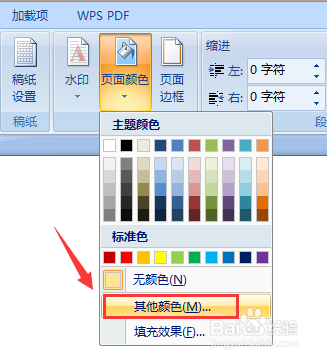
2、点击“页面颜色躲独”铲译

3、点击“其他颜色”
4、点击“自定义”
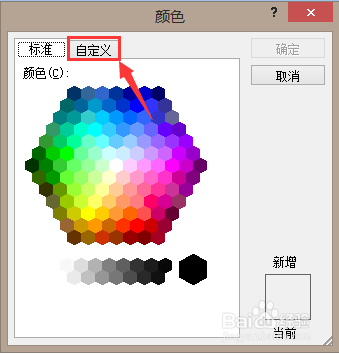
5、设置红色199绿色237蓝色204

6、点击“确定”,文档页面颜色就设置成了保护眼睛的豆绿色

1、对于没有“护眼模式”选项的word文档,如何设置护眼模式呢,点击沟涛爷“页面布局”
2、点击“页面颜色躲独”铲译
3、点击“其他颜色”
4、点击“自定义”
5、设置红色199绿色237蓝色204
6、点击“确定”,文档页面颜色就设置成了保护眼睛的豆绿色