问答者经验网
首页
美食营养
生活百科
知识问答
生活知识
返回
问答者经验网
首页
美食营养
游戏数码
手工爱好
生活知识
生活百科
健康养生
运动户外
职场理财
情感交际
母婴教育
时尚美容
知识问答
更多知识
搜索
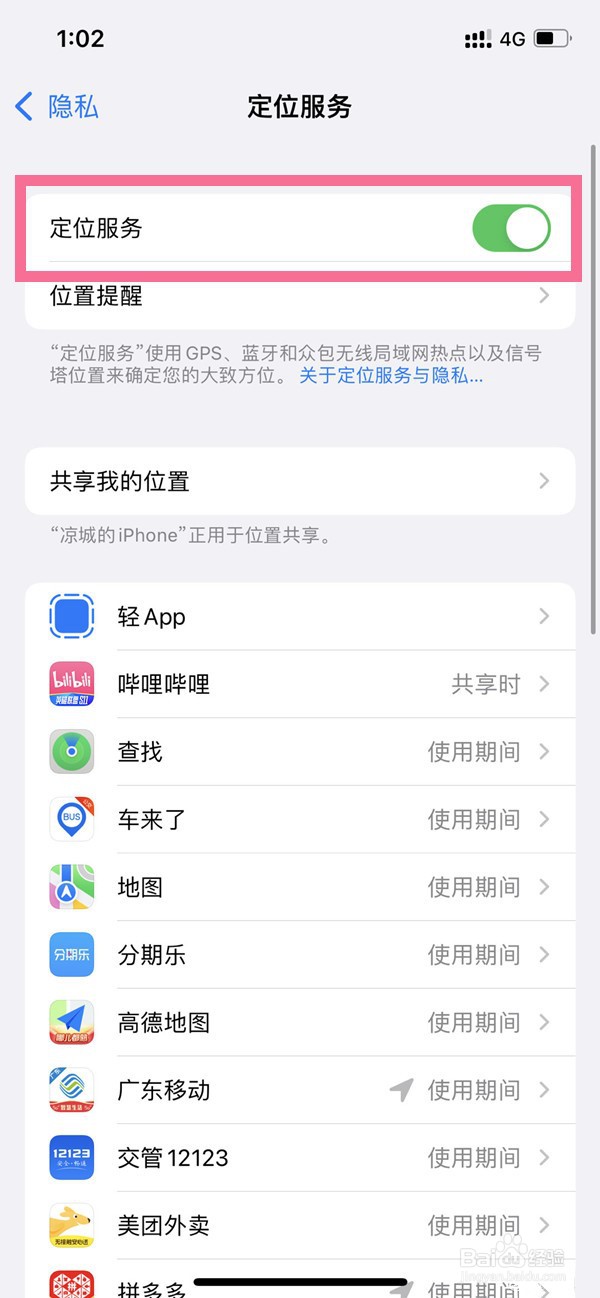
苹果14plus怎么关闭定位
2026-04-23 03:04:33
1、打开手机设置,点击【隐私与安全性】。
2、点击【定位服务】选项。
3、关闭【定位服务】右边的开关即可。
相关推荐
苹果14如何关闭共享位置的应用
阅读量:145
苹果13怎么修改锁屏密码
阅读量:117
苹果14的APP请求跟踪功能在哪关
阅读量:36
iphone14pro定位服务功能如何关掉
阅读量:139
iphone11飞行模式开启方法
阅读量:168
猜你喜欢
ftp是什么
get out是什么意思
嘎巴拉是什么
结婚八年是什么婚
ps是什么材料
什么是权重
水洗皮是什么皮
受精卵着床有什么感觉
佝偻病是什么
用醋泡脚有什么好处
猜你喜欢
草莓是什么意思
大便溏稀是什么原因
few是什么意思
不言而喻的喻是什么意思
天蝎座和什么座最配
论语是一部什么著作
痛苦的反义词是什么
华为p40和p40pro有什么区别
袋鼠的尾巴有什么作用
父爱如什么